
Grow your store on WhatsApp.
Practical guides for WhatsApp Business automation — plus competitor comparisons that show where teams start free and unlock up to 6 months free total.
How to Create a Click-to-WhatsApp Chat URL for Google Business Profile (GMB)
Create a WhatsApp click-to-chat URL for Google Business Profile (GMB), add a pre-filled message, publish it, test it, and fix rejected links.
Read →Instagram DM Management in 2026: DMs + WhatsApp in One Inbox
Manage Instagram DMs without living in the app: connect your professional account and answer DMs and WhatsApp from one shared team inbox.
Read →Facebook Messenger Customer Service: One Inbox for Messenger + WhatsApp (2026)
Answer Facebook Messenger and WhatsApp from one shared team inbox: connect your Page, tag conversations by channel, reply as your Page.
Read →Instagram DM Reply Templates for Business (2026)
Copy-paste Instagram DM reply templates for price checks, orders, bookings and support — and save them as canned responses in one shared inbox.
Read →Omnichannel Customer Service for Small Business: WhatsApp, Instagram & Web Chat (2026)
Omnichannel customer service without enterprise software: WhatsApp, Messenger, Instagram DMs and web chat in one shared inbox your whole team can answer.
Read →WhatsApp + Instagram for D2C Ecommerce: From DM to Repeat Order (2026)
Instagram gets the discovery, WhatsApp closes and keeps the customer: one inbox for D2C product questions, order updates and cart recovery.
Read →Click-to-Messenger & Instagram DM Ads: Where the Leads Land (2026)
Meta messages ads open a Messenger or Instagram DM thread with your business. Run them so every lead lands in the same inbox as your WhatsApp sales chat.
Read →How to Add a Countdown Timer to Your Website (Free, 2026)
Add a free countdown timer to any website: set the end time, pick colours, paste one self-contained snippet. Live preview included.
Read →WhatsApp vs SMS Cost in India: Which Is Cheaper in 2026?
WhatsApp vs SMS cost in India, per message type: OTPs, transactional and marketing sends — with a free ₹ calculator for your mix.
Read →WhatsApp API Pricing Calculator: Estimate Your Monthly Meta Fee (2026)
Estimate your monthly WhatsApp Business API Meta fee — country, volumes, USD or INR, editable rates. Per-message billing explained.
Read →WhatsApp Blue Tick Checker: Are You Eligible for the Verified Badge? (2026)
Answer 7 questions to see if your business qualifies for the WhatsApp verified badge (blue tick, formerly green tick) — free and private.
Read →WhatsApp vCard QR Code: The Scan-to-Save Business Card Generator (2026)
A vCard QR saves your business card in one scan — name, WhatsApp number, company, email and website. Free PNG, SVG and .vcf downloads.
Read →Bulk WhatsApp Link Generator: wa.me Links for Many Numbers at Once (2026)
Paste a customer list from Excel or Sheets and get a wa.me link for every number — one pre-filled message, copy all or CSV. Free.
Read →WhatsApp Text Formatter: Bold, Italic & Strikethrough in One Tap (2026)
Format WhatsApp text in one tap: bold, italic, strikethrough, monospace, lists and quotes with a live preview — copy and paste anywhere. Free, no account.
Read →WhatsApp Link Generator: Make a Free wa.me Click-to-Chat Link (2026)
Make a free wa.me click-to-chat link for any WhatsApp number — pre-fill the message, then copy it to your bio, email, ads or packaging. No account, no API, free forever.
Read →WhatsApp QR Code: How to Make One With Your Logo & Colors (2026)
What a WhatsApp QR code is, where a scan beats a URL, and how to make a free one with your logo and brand colors — PNG or SVG for print. No signup, no watermark.
Read →WhatsApp Statistics 2026: Users, Business Messaging & Commerce Data
WhatsApp statistics for 2026: 3B+ monthly and 2B+ daily users, 200M+ businesses, 22-market consumer data, India UPI and AI messaging trends — every figure sourced.
Read →How to Add a WhatsApp Button to Squarespace (Free — No Extension Needed)
Add a floating WhatsApp button to your Squarespace site in two minutes — free. Pick one of 8 WhatsApp-only styles, enter your number and paste one line of code into Settings → Developer Tools → Code Injection. No extension, no account.
Read →How to Add a WhatsApp Button to Blogger (Free — No Gadget Needed)
Add a floating WhatsApp button to your Blogger blog in two minutes — free. Pick one of 8 WhatsApp-only styles, enter your number and paste one line of code into Theme → Edit HTML. No gadget, no account.
Read →How to Add a WhatsApp Button to Webflow (Free — No App Needed)
Add a floating WhatsApp button to your Webflow site in two minutes — free. Pick one of 8 WhatsApp-only styles, enter your number and paste one line of code into Site settings → Custom code → Footer code. No app, no account.
Read →How to Add a WhatsApp Button to HubSpot (Free — No App Needed)
Add a floating WhatsApp button to your HubSpot website in two minutes — free. Pick one of 8 WhatsApp styles, enter your number and paste one line of code into Settings → Websites → Pages. No app install, no account.
Read →How to Add a WhatsApp Button to Shopify (Free — No App Store Install)
Add a floating WhatsApp button to your Shopify store in two minutes — completely free. Pick one of 8 styles, enter your number and paste a single line of code into theme.liquid. No app store, no subscription, no account.
Read →Click to AI Chat for Wix: AI Chat Widget for Your Wix Store (2026)
AI chat for Wix stores — the AI answers from your own site and product catalog, with product cards and auto language. One inbox for WhatsApp and web chat.
Read →Add a WhatsApp Button to Your Wix Site (2026): Free Click to Chat + AI Upgrade
Add a free WhatsApp button to your Wix site — number only, no account or API key. Icons, colours and position included; upgrade to AI chat anytime.
Read →WhatsApp Marketing Templates: 15+ Copy-Paste Examples (2026)
WhatsApp marketing templates with 15+ copy-paste examples: flash sales, coupons, cart recovery and win-backs - with opt-out lines, approval and cost notes.
Read →WhatsApp Utility Templates: 15+ Copy-Paste Examples (2026)
WhatsApp utility templates with 15+ copy-paste examples: order updates, appointment reminders, payment notices and codes - approval rules and cost notes included.
Read →The 6 WhatsApp Templates Every WooCommerce Store Needs (Copy Included)
The six WhatsApp templates every WooCommerce store should ship with - order confirmed, cancelled, shipped, cart recovery, on hold and payment failed - with copy and submission notes.
Read →WhatsApp Automation Flows That Actually Convert (With Real Templates)
WhatsApp automation flows that convert: welcome, order lifecycle, abandoned cart, COD confirm, win-back and review request - with ready-to-paste templates and timing.
Read →WhatsApp vs Email vs SMS for Order Notifications: 2026 Data
WhatsApp vs email vs SMS for order notifications: open rates, response time, cart recovery and cost shape - and the channel mix that fits each message type in 2026.
Read →WhatsApp Marketing for E-commerce: The Complete 2026 Guide
The complete 2026 guide to WhatsApp marketing for e-commerce: consent, template categories, automation flows, segmented campaigns and the metrics that matter.
Read →How to Get WhatsApp Business API Approval in India (2026)
How to get WhatsApp Business API approval in India in 2026: business verification, WABA provisioning, display names, opt-in and template approval - with realistic timelines.
Read →Best WooCommerce WhatsApp Plugins for Automation & Order Alerts (2026)
WooCommerce WhatsApp plugins compared by tier: free chat buttons, automation connectors and full platforms - and which tier your store actually needs.
Read →WhatsApp Button for WooCommerce: Placement, Hours & CTA Copy (2026)
Where to put a WhatsApp button on WooCommerce (product, cart, checkout), when to hide it, and CTA copy that gets customers chatting instead of leaving.
Read →Check WooCommerce Order Status in Your Store Chat (2026)
Let WooCommerce customers check order status in chat - no login, no email hunting. How AI order lookup works in the widget and on WhatsApp.
Read →Pre-Sale Chat for WooCommerce: Answer Questions Before Carts Die (2026)
Pre-sale chat for WooCommerce: shipping, sizing, COD and returns questions answered instantly - before the visitor abandons the cart.
Read →AI Chatbot for WooCommerce That Recommends Real Products (2026)
An AI chatbot for WooCommerce should answer from your live catalog - real products, prices and photos. What to look for, and how to put one on your store.
Read →Recover Abandoned WooCommerce Carts on WhatsApp: Playbook + Templates (2026)
Recover abandoned WooCommerce carts over WhatsApp: checkout consent, nudge timing, quiet hours and copy-paste templates that win 15-30% back.
Read →WooCommerce Chat Automation Flows: Cart to Win-Back, Mapped (2026)
WooCommerce chat automation flows end to end: welcome message, abandoned cart, order updates and win-back - and which runs best in chat vs WhatsApp.
Read →One Inbox for WooCommerce Support: Web Chat + WhatsApp (2026)
Run WooCommerce support from one inbox: website chat and WhatsApp side by side, with order context. Setup, routing and reply-time tips for a small team.
Read →Free WhatsApp Chat Plugins for WooCommerce: 7 Honest Options (2026)
Free WhatsApp chat plugins for WooCommerce compared honestly: buttons vs real chat windows, free-tier caps, and what actually lands messages in your WhatsApp.
Read →8 Live Chat Tactics That Recover WooCommerce Carts (2026)
Live chat tactics that recover WooCommerce carts: proactive nudges, cart-aware replies, order lookup in chat and lead capture that turns leavers into buyers.
Read →Chat vs Email for WooCommerce Support: What the Data Says (2026)
Chat vs email for WooCommerce support: response-time benchmarks, conversion impact and when each channel earns its keep on a store budget.
Read →WhatsApp Button vs Chat Widget on WordPress: Which Converts Better? (2026)
A floating WhatsApp button sends visitors away to wa.me; an on-page chat widget with AI keeps them on your site. Which converts better in 2026 — and when each wins.
Read →Chaty Alternatives (2026): Click-to-Chat & WhatsApp Widgets Compared
Chaty is a popular multi-channel click-to-chat widget — but every channel still opens a link. Compare alternatives that offer real chat windows, AI and WhatsApp inboxes.
Read →Smartsupp Alternatives (2026): Free Live Chat With Real AI
Smartsupp's free plan allows one operator and 25 chats a month. Compare alternatives for 2026 — free seats, AI that answers, and WhatsApp in the same inbox.
Read →HubSpot Live Chat Alternatives (2026): Free Widgets Without the CRM Lock-in
HubSpot's free chat makes sense mainly inside its CRM. Compare free chat widgets for 2026 that work standalone — with AI, WhatsApp and no marketing-suite lock-in.
Read →How to Add AI Chat to WordPress (2026): Plugins, Widgets & Auto-Pilot
Add AI chat to WordPress in 2026: hosted widgets that answer from your knowledge base vs plugins that need your own API key — full step-by-step setup.
Read →One Inbox for WhatsApp + Website Chat: The 2026 Setup Guide
Stop juggling the WhatsApp Business app and a separate live chat tool. WhatsApp and web chat in one team inbox — with one AI, one knowledge base and clear channel tags.
Read →Why Every WordPress Site Needs a Chat Widget (2026): 9 Benefits With Teeth
Nine measurable reasons to put a chat widget on your WordPress site in 2026 — from capturing leads mid-question to AI answering after hours — and the free way to start.
Read →Tawk.to Alternatives (2026): Smarter, Free WordPress Chat Options
Tawk.to is free and powerful — but its chat is human-only at heart. Compare real alternatives for 2026: AI that answers, WhatsApp in the same inbox, and honest costs.
Read →Joinchat Alternatives (2026): WhatsApp Buttons & Real Chat Compared
Joinchat is the most-installed WhatsApp button plugin (700k+ sites) — but the click still opens wa.me. Compare it with real chat windows, AI answers and one inbox.
Read →Let AI Answer Your WordPress Chat 24/7: Auto-Pilot Setup (2026)
Set up AI Auto-Pilot for your WordPress chat: instant answers from your knowledge base, handoff to humans on request, after-hours coverage — step by step, free.
Read →Send Website Chat Leads to WhatsApp: Capture, Alert & Reply in One Flow (2026)
Turn website chat into WhatsApp conversations: capture the lead in chat, get an instant alert, reply from your team inbox — or continue the chat on WhatsApp.
Read →How to Add Live Chat & WhatsApp to WooCommerce (2026): Support That Sells
Add live chat and WhatsApp to WooCommerce: AI answers product questions, shoppers get order help in the chat, and every conversation lands in one inbox with the store.
Read →Crisp Alternatives (2026): Flat-Price Chat Without the Seat Math
Crisp's free tier is capped at two seats and paid plans run $45-$295 per workspace. Compare honest alternatives for 2026 — including free chat with AI and WhatsApp.
Read →Tidio Alternatives (2026): Free Chat & AI Without Conversation Caps
Tidio's free plan allows 50 conversations a month and paid plans cap AI chats. Compare alternatives with uncapped free chat, honest AI and a WhatsApp-native inbox.
Read →Best WordPress Chat Plugins in 2026: Free, WhatsApp & AI Compared
The best WordPress chat plugins of 2026 compared by installs, price and type — free chat windows, WhatsApp buttons and AI chat — plus which one fits your site.
Read →LiveChat Alternatives (2026): Better Value for Small Teams
LiveChat is polished but per-agent priced, with no free tier and AI sold separately. Compare real alternatives for 2026 — flat and free options included.
Read →Best Free Live Chat Software in 2026: Real Limits, Compared
Every 'free' live chat tool has limits — seats, conversations or branding. Compare the real free tiers of 2026 and find the one that stays free as you grow.
Read →Intercom Alternatives (2026): AI Support Without Enterprise Pricing
Intercom is powerful and per-seat priced, with Fin billed per resolution. Compare honest alternatives for small teams — free AI chat, flat pricing and WhatsApp included.
Read →Chat Widgets & GDPR on WordPress (2026): Consent, Data & Compliance
Chat widgets collect personal data — so GDPR applies. A practical compliance guide: consent, cookies, data minimization, retention, and what to check in any chat plugin.
Read →Live Chat vs WhatsApp for Business (2026): Which One Converts?
Live chat widgets keep visitors on your page; WhatsApp meets customers where they already chat. Compare costs, reach and workflows — and how to run both in one inbox.
Read →
WhatsApp for Shopify: Automate Order Updates + Cart Recovery (2026)
Turn Shopify store events into WhatsApp messages automatically — order confirmations, shipping updates, delivery alerts and abandoned-cart recovery — with replies landing in one shared inbox.
Read →
How to Add a WhatsApp Chat Button to Your Shopify Store (2026)
Three ways to add a WhatsApp chat button to Shopify — a wa.me link, a theme snippet, or a chat widget — plus how to handle the chats so pre-sale questions become orders.
Read →WhatsApp Back-in-Stock & Price-Drop Alerts: Recover Intent (2026)
Customers who wanted a product but found it sold out or too expensive are the easiest sales you'll ever recover. WhatsApp back-in-stock and price-drop alerts do it automatically.
Read →WhatsApp Replenishment Reminders: 'Time to Reorder' Messages (2026)
For consumables — coffee, skincare, pet food, supplements — the reorder moment is predictable. WhatsApp replenishment reminders hit it automatically.
Read →WhatsApp Birthday & Loyalty Offer Templates: Personal Touches That Sell (2026)
A birthday message with a real discount is one of the highest-responding messages a store sends. Here's how to automate birthday and loyalty offers on WhatsApp.
Read →WhatsApp Product Carousel Templates: Send 10 Products in One Message (2026)
A WhatsApp product carousel lets you send up to 10 products — each with its own photo, price and Buy button — in a single swipeable message. Here's how to build and send one.
Read →WhatsApp Coupon Code Button Templates: Tap-to-Copy Discounts in Chat (2026)
A WhatsApp coupon-code button lets customers copy a discount code with one tap, right in the chat. Here's how to build coupon templates that actually get redeemed.
Read →WhatsApp Flash Sale Templates with Live Countdown Timers (2026)
A WhatsApp limited-time-offer (LTO) template shows a live countdown timer inside the message — urgency that emails can't match. Here's how to build and send flash-sale templates.
Read →WhatsApp Product Video Messages: Show Products in Motion (2026)
Video is the highest-engagement format on WhatsApp. Here's how to send product video templates — a short clip in the message header plus a Shop Now button.
Read →WhatsApp Invoice & Document Templates: Send PDFs in the Chat (2026)
Send invoices, receipts and delivery notes as document-header WhatsApp templates — the PDF opens right in the chat with a View Invoice button alongside.
Read →WhatsApp Delivery OTP & Pickup Codes: Verify Deliveries in Chat (2026)
Send a one-time delivery or pickup code on WhatsApp so the courier only hands over the parcel after the customer quotes the code. A practical way to cut RTO and fake orders.
Read →WhatsApp Return & Refund Status Messages: Fewer Support Chats (2026)
Refund and return updates are the support messages stores answer on repeat. Automate them on WhatsApp — the customer gets the status push without asking.
Read →WhatsApp Cross-Sell & Upsell Messages: Sell More to Buyers You Have (2026)
Your past buyers already trust you — the cheapest sales you'll ever make. WhatsApp cross-sell and upsell templates put complementary products in front of them at the right moment.
Read →WhatsApp Review Request Templates: 3–5x More Reviews (2026)
Customers leave 3–5x more reviews when you ask on WhatsApp instead of email. Here's how to automate review requests with product photos and one-tap replies.
Read →
WhatsApp Opt-in at Shopify Checkout: Consent Setup + Copy That Converts (2026)
A delivery phone number is not WhatsApp marketing consent. Here's how Shopify stores should collect a valid, compliant WhatsApp opt-in at checkout — with copy templates and the audit fields to store.
Read →
Shopify COD Confirmation on WhatsApp: Cut RTO for D2C Stores (2026)
For Shopify D2C stores in India, fake COD orders and return-to-origin shipments bleed margin. Confirming cash-on-delivery orders on WhatsApp cuts both — here's the exact flow and templates.
Read →
Top WhatsApp Apps for Shopify in 2026 (Compared)
The Shopify WhatsApp app landscape in 2026: chat button apps, cart-recovery apps and full automation platforms — what each tier does, what it costs, and when to move up.
Read →Chirpvo – Chat Button: Add a Floating WhatsApp Button (2026)
Add a free floating WhatsApp button to WordPress — 8 icons, pre-filled messages, display rules, WooCommerce buttons. No API keys — upgrade to AI from settings.
Read →Chatvio – AI Webchat: Add a Chat Button to Your Site (2026)
Add a floating chat button to WordPress — a real chat window, WhatsApp + web chat in one inbox, and a WhatsApp bubble that targets your Tech Pad number or any number.
Read →WhatsApp Flows in 2026: In-Chat Forms That Beat Web Forms
What WhatsApp Flows are, how multi-screen in-chat forms work in 2026, eight use cases from bookings to COD confirmation, and how Flows compare with your WordPress forms.
Read →How to Add a WhatsApp Chat Button to WordPress (3 Free Ways, 2026)
Three free ways to add a WhatsApp chat button to WordPress — a wa.me link, a floating button snippet, or a plugin — plus when to switch to the API for automatic updates.
Read →How to Add an "Order on WhatsApp" Button to WooCommerce (2026)
Add an Order on WhatsApp button to WooCommerce product and cart pages with items pre-filled — then automate confirmations and COD checks through the official API.
Read →WhatsApp Green Tick Verification in 2026: How to Apply (and Why You May Not Need It)
How WhatsApp's green tick — now a verified badge — works in 2026, the real eligibility bar, how to apply in Meta Business Manager, and what actually builds trust.
Read →Why WhatsApp Templates Get Rejected: 12 Reasons and the Exact Fix (2026)
The twelve reasons Meta rejects or re-categorises WhatsApp templates in 2026 — category mismatch, promo wording, bad variables — and the exact fix for each.
Read →WhatsApp Messaging Limits and Tiers in 2026: How to Raise Your Daily Cap
How WhatsApp messaging tiers work in 2026 — 250, 1K, 10K, 100K and unlimited — what triggers an upgrade or a downgrade, and how the 256-contact broadcast cap fits in.
Read →WhatsApp Catalog in 2026: Set Up In-Chat Shopping the Right Way
How to set up a WhatsApp catalog in 2026 — Business app, Meta Commerce Manager or API product messages — and which parts of the journey belong on your website.
Read →WhatsApp Business Number Banned or Restricted? The 2026 Recovery Playbook
What triggers a WhatsApp Business ban or restriction in 2026, how to appeal through Meta's support flow, and the checklist that keeps quality rating green.
Read →WhatsApp Coexistence in 2026: Run the Business App and the API on One Number
Coexistence lets a small team keep the WhatsApp Business app on a phone while the same number runs on the Cloud API — what syncs, what does not, and who should switch on.
Read →20 WhatsApp Message Templates for Clinics and Healthcare (2026)
Twenty copy-paste WhatsApp templates for clinics, dentists and diagnostics — reminders, reports ready, follow-ups — approval-safe and privacy-aware for 2026.
Read →Best WordPress WhatsApp Plugins in 2026: Chat Buttons vs Notification Connectors
The WordPress WhatsApp plugin landscape in 2026: click-to-chat widgets, notification connectors and full API platforms — what each type does and when you need it.
Read →18 WhatsApp Message Templates for Real Estate Teams (2026)
Eighteen WhatsApp templates for real estate — enquiry replies, site-visit confirmations, document follow-ups and post-visit nudges — with approval-safe wording for 2026.
Read →WhatsApp Business Message Templates: 25 Ready-to-Use Examples (2026)
25 ready-to-use WhatsApp Business message templates for order updates, booking reminders, cart recovery and more — plus how template approval works in 2026.
Read →WhatsApp Template Categories Explained: Marketing vs Utility vs Authentication (2026 Pricing)
How WhatsApp's marketing, utility and authentication template categories differ — approval, pricing and which category each message should use, with 2026 rates.
Read →How to Send Bulk WhatsApp Notifications Without Getting Blocked (2026)
Send order updates, reminders and campaigns to thousands of customers on WhatsApp without a ban — opt-in, approved templates, rate limits and quality rating.
Read →WhatsApp Business App vs WhatsApp Business API: Which Should You Use in 2026?
WhatsApp Business App vs Business API compared — price, limits, team access, automation, verification and analytics — plus a decision guide for your business.
Read →Click-to-WhatsApp Ads: 2026 Setup, Cost and the Free 72-Hour Window
How click-to-WhatsApp (CTWA) ads turn Facebook and Instagram ads into WhatsApp conversations — Ads Manager setup, the free 72-hour window and costs.
Read →How to Send MemberPress Signup Notifications to WhatsApp
Send MemberPress signup and renewal notifications to WhatsApp automatically with the free Tech Pad plugin — official API, no monthly fee.
Read →How to Send FluentCRM Contact Notifications to WhatsApp
Send FluentCRM contact and tag-change notifications to WhatsApp automatically with the free Tech Pad plugin — official API, no monthly fee.
Read →How to Send LearnPress Enrollment Notifications to WhatsApp
Send LearnPress enrollment confirmations to students on WhatsApp automatically with the free Tech Pad plugin — official API, no monthly fee.
Read →How to Send Paid Memberships Pro Signup Notifications to WhatsApp
Send Paid Memberships Pro signup and renewal notifications to WhatsApp automatically with a free WordPress plugin — welcome new members the moment they join.
Read →How to Send Tutor LMS Enrollment Notifications to WhatsApp
Send Tutor LMS enrollment confirmations to students on WhatsApp automatically with the free Tech Pad plugin on your own verified number.
Read →How to Send WP Job Manager Application Notifications to WhatsApp (New Candidate Alerts)
Send WP Job Manager application alerts to WhatsApp — connect WP Job Manager to the WhatsApp Business API and get every new candidate on your phone instantly.
Read →How to Send GiveWP Donation Notifications to WhatsApp (New Donor Alerts)
Send GiveWP donation alerts to WhatsApp — connect GiveWP to the WhatsApp Business API and get every completed donation on your phone instantly.
Read →How to Send Charitable Donation Notifications to WhatsApp (New Donor Alerts)
Send Charitable donation alerts to WhatsApp — connect Charitable to the WhatsApp Business API and get every completed donation on your phone instantly.
Read →How to Send Simply Schedule Appointments Notifications to WhatsApp (Confirmations + Reminders)
Send Simply Schedule Appointments booking confirmations and reminders to WhatsApp — connect SSA to the WhatsApp Business API, cut no-shows and keep clients updated with ready templates.
Read →How to Send Easy Digital Downloads Order Notifications to WhatsApp (New Orders + Receipts)
Send Easy Digital Downloads order confirmations, download links and license keys to WhatsApp — connect EDD to the WhatsApp Business API and automate customer updates with templates.
Read →How to Send Contact Form 7 Form Submissions to WhatsApp (Free, No Code)
Send every Contact Form 7 submission straight to WhatsApp — connect CF7 to the WhatsApp Business API, map your form fields, and get instant lead alerts with ready-to-use templates.
Read →How to Connect Forminator Forms to WhatsApp (Step by Step)
Connect Forminator forms to WhatsApp and get every submission delivered instantly — field mapping, admin alerts, customer confirmations and ready-to-use templates.
Read →How to Send Formidable Forms Entries to WhatsApp
Send Formidable Forms entries to WhatsApp automatically — connect to the WhatsApp Business API, map your fields, and get instant lead alerts with ready templates.
Read →How to Send Elementor Form Submissions to WhatsApp — 2 Ways (Redirect + Auto-Send)
Two ways to connect Elementor Pro forms to WhatsApp: redirect visitors to a chat with wa.me links, or auto-send every submission to your team via the WhatsApp Business API — with templates included.
Read →How to Send WPForms Entries to WhatsApp (Notifications + Auto-Reply)
Get every WPForms entry delivered to WhatsApp instantly — connect WPForms to the WhatsApp Business API, map fields, and automate team alerts plus customer confirmations with ready templates.
Read →How to Send Gravity Forms Submissions to WhatsApp (Admin Alerts & Customer Replies)
Connect Gravity Forms to WhatsApp and send every submission to your team instantly — plus automated customer confirmations, with field mapping and ready-to-use templates.
Read →How to Send Bookly Booking Confirmations & Reminders to WhatsApp
Send Bookly booking confirmations, reminders and follow-ups to WhatsApp — cut no-shows and reply faster with automated appointment notifications and ready templates.
Read →How to Send Amelia Appointment Notifications to WhatsApp (Confirmations, Reminders, Auto-Reply)
Send Amelia booking confirmations, reschedule alerts, reminders and auto-replies to WhatsApp — keep customers informed and cut no-shows with ready-to-use templates.
Read →How to Send SureCart Order Notifications to WhatsApp (New Orders + Receipts)
Send SureCart order confirmations, payment-failure alerts and receipts to WhatsApp — connect SureCart to the WhatsApp Business API and automate customer updates with templates.
Read →How to Send Event Ticket Confirmations & QR Tickets to WhatsApp
Send event ticket confirmations and QR tickets to attendees' WhatsApp — connect Event Tickets to the WhatsApp Business API, automate confirmations and reminders, and cut no-shows.
Read →How to Send Event Registration & Reminder Notifications to WhatsApp
Send event registration confirmations, schedule updates and day-before reminders to WhatsApp — connect The Events Calendar to the WhatsApp Business API with ready templates.
Read →How to Send Events Manager Booking Confirmations to WhatsApp
Send Events Manager booking confirmations and reminders to WhatsApp — connect to the WhatsApp Business API, map booking events, and keep attendees informed with templates.
Read →How to Send LatePoint Appointment Notifications to WhatsApp
Send LatePoint appointment confirmations and reminders to WhatsApp — connect to the WhatsApp Business API, cut no-shows and keep clients updated with ready templates.
Read →How to Send SureForms Submissions to WhatsApp
Send SureForms submissions to WhatsApp instantly — connect SureForms to the WhatsApp Business API, map your fields, and get lead alerts plus confirmations with templates.
Read →How to Send Fluent Forms Submissions to WhatsApp
Send Fluent Forms submissions to WhatsApp instantly — connect Fluent Forms to the WhatsApp Business API, map fields, and automate lead alerts plus confirmations with templates.
Read →How to Send Ninja Forms Submissions to WhatsApp (Step by Step)
Send every Ninja Forms submission to WhatsApp automatically — connect Ninja Forms to the WhatsApp Business API, map your fields, and never miss a lead again.
Read →Freshchat Alternatives (2026): Better WhatsApp Platforms for Growing Teams
Freshchat is strong for omnichannel support, but WhatsApp gets expensive fast. Compare better alternatives and see how The Tech Pad gives teams up to 6 months free.
Read →Gallabox Alternatives (2026): Simpler WhatsApp Platforms Without the Add-On Creep
Gallabox pricing grows with quarterly billing, user caps, and add-ons. Compare better WhatsApp-first alternatives and see how The Tech Pad gives teams up to 6 months free.
Read →DoubleTick Alternatives (2026): Better WhatsApp Options for Sales, Support, and Store Teams
DoubleTick works for mobile-first sales teams, but many businesses need a broader WhatsApp workspace. Compare alternatives and see how The Tech Pad gives teams up to 6 months free.
Read →Verloop Alternatives (2026): Better WhatsApp Platforms for Teams That Want Simpler Buying and Cleaner Operations
Verloop.io is strong for AI-driven support, but many teams want simpler buying and faster setup. Compare alternatives and see how The Tech Pad gives teams up to 6 months free.
Read →LimeChat Alternatives (2026): Better WhatsApp Platforms for Teams That Want Simpler Support and Commerce Operations
LimeChat is compelling for D2C brands, but many teams still want simpler pricing and operations. Compare alternatives and see how The Tech Pad gives teams up to 6 months free.
Read →Kaleyra Alternatives (2026): Better WhatsApp Platforms for Teams That Do Not Need Enterprise CPaaS Complexity
Kaleyra is strong for enterprise messaging, but many businesses need a finished WhatsApp product. Compare alternatives and see how The Tech Pad gives teams up to 6 months free.
Read →Twilio Alternatives (2026): Easier WhatsApp Platforms for Teams That Do Not Want to Build Everything
Twilio is powerful for developers, but most teams want a ready-made WhatsApp product. Compare alternatives and see how The Tech Pad gives teams up to 6 months free.
Read →MSG91 Alternatives (2026): Better WhatsApp Platforms for Teams That Need More Than Raw Pricing
MSG91 is attractive for raw pricing, but many teams need a stronger inbox and simpler workflows. Compare alternatives and see how The Tech Pad gives teams up to 6 months free.
Read →Yellow.ai Alternatives (2026): Better WhatsApp Platforms for Teams That Do Not Need Enterprise AI Overkill
Yellow.ai is powerful for enterprise automation, but many teams need faster setup and simpler pricing. Compare alternatives and see how The Tech Pad gives teams up to 6 months free.
Read →Ameyo Alternatives (2026): Better WhatsApp Platforms for Teams That Do Not Need Contact-Center Bloat
Ameyo is a serious contact-center product, but many teams need something lighter and faster to launch. Compare alternatives and see how The Tech Pad gives teams up to 6 months free.
Read →Bookly WhatsApp Booking Notifications: How to Set Up (2026)
Get every booking from Bookly on WhatsApp instantly — features, requirements, a 10-minute install and approved-template setup with The Tech Pad.
Read →Elementor Forms WhatsApp Integration: How to Set It Up (2026)
Get every form submission from Elementor Forms on WhatsApp instantly — features, requirements, a 10-minute install and approved-template setup with The Tech Pad.
Read →Gravity Forms WhatsApp Integration: How to Set It Up (2026)
Get every form submission from Gravity Forms on WhatsApp instantly — features, requirements, a 10-minute install and approved-template setup with The Tech Pad.
Read →WPForms WhatsApp Integration: How to Set It Up (2026)
Get every form submission from WPForms on WhatsApp instantly — features, requirements, a 10-minute install and approved-template setup with The Tech Pad.
Read →Fluent Forms WhatsApp Integration: How to Set It Up (2026)
Get every form submission from Fluent Forms on WhatsApp instantly — features, requirements, a 10-minute install and approved-template setup with The Tech Pad.
Read →Forminator WhatsApp Integration: How to Set It Up (2026)
Get every form submission from Forminator on WhatsApp instantly — features, requirements, a 10-minute install and approved-template setup with The Tech Pad.
Read →Amelia WhatsApp Booking Notifications: How to Set Up (2026)
Get every booking from Amelia on WhatsApp instantly — features, requirements, a 10-minute install and approved-template setup with The Tech Pad.
Read →Contact Form 7 WhatsApp Integration: How to Set It Up (2026)
Get every form submission from Contact Form 7 on WhatsApp instantly — features, requirements, a 10-minute install and approved-template setup with The Tech Pad.
Read →Formidable Forms WhatsApp Integration: How to Set It Up (2026)
Get every form submission from Formidable Forms on WhatsApp instantly — features, requirements, a 10-minute install and approved-template setup with The Tech Pad.
Read →Ninja Forms WhatsApp Integration: How to Set It Up (2026)
Get every form submission from Ninja Forms on WhatsApp instantly — features, requirements, a 10-minute install and approved-template setup with The Tech Pad.
Read →SureForms WhatsApp Integration: How to Set It Up (2026)
Get every form submission from SureForms on WhatsApp instantly — features, requirements, a 10-minute install and approved-template setup with The Tech Pad.
Read →Best WhatsApp API Providers in India (2026): 9 Compared Honestly
Nine WhatsApp Business API providers compared with real 2026 numbers — plans, per-message markups, seat caps and AI add-ons — plus who should pick what and the red flags to check before you sign.
Read →Respond.io Alternatives (2026): Cheaper WhatsApp API Options Compared
Respond.io's $79/month Starter excludes broadcasts and AI Agents; Growth ($159) meters contacts and AI credits. Eight alternatives — including a flat-INR plan that bundles inbox, AI and e-commerce connectors.
Read →AiSensy Alternatives (2026): Cheaper WhatsApp API Options Compared
AiSensy's ₹1,500/month Basic plan hides a reported ~12% message markup, a ₹1,999–2,500/month chatbot add-on and ₹750/month extra agents. Eight alternatives — including one that bundles Shopify, WooCommerce and AI into a flat monthly price.
Read →Interakt Alternatives (2026): Cheaper WhatsApp API Options Compared
Interakt's ~₹3,499–7,699/quarter plans layer reported 21–39% per-message markups, a ~₹10,000/month AI add-on and seat caps. Eight alternatives — including one that bundles Shopify, WooCommerce and AI into a flat monthly price.
Read →AI Chatbot vs Human Agents on WhatsApp: Where to Draw the Line
AI answers instantly; humans answer correctly. The hybrid playbook for WhatsApp support — which queries to automate, which to route to a person, and how one shared inbox makes the handoff seamless.
Read →Multi-Agent WhatsApp Chat: Run a Support Team in One Inbox
Every customer on WhatsApp, one shared inbox, N agents. How multi-agent WhatsApp chat works — roles, assignment, AI assist per agent — and why seat-based plans beat per-user add-ons.
Read →Gupshup Alternatives (2026): Cheaper WhatsApp API Providers for India
Gupshup's self-serve charges $0.001 per message, but managed plans start at ₹4,000–15,000+/month with no public price list. Six cheaper alternatives for Indian SMBs and D2C brands.
Read →WhatsApp Business API Pricing in India (2026): Real Costs Compared
The real cost of WhatsApp API in India in 2026 — Meta's per-message rates, platform fees, markups, and worked monthly bills for 5,000–20,000 messages across WATI, Gupshup, AiSensy, Interakt and The Tech Pad.
Read →The Hidden Costs of WhatsApp API Platforms (2026): Markups, Add-Ons & Per-User Fees
The plan price is the headline; the bill is the sequel. How message markups, per-user fees, Shopify add-ons and AI subscriptions quietly add ₹3,000–10,000/month — and the questions to ask before you sign.
Read →AI on WhatsApp in 2026: Auto-Replies, Copilots and What Actually Works
From auto-replies to AI copilots that draft, summarise and answer from your knowledge base — what AI on WhatsApp can do today, where it fails, and how to run it without breaking customer trust.
Read →WATI Alternatives (2026): 7 Cheaper Options Compared
WATI's $59–$279/month plans hide a ~20% message markup, a $4.99 Shopify add-on and $24–69/month per extra user. Seven alternatives — including one that includes Shopify, WooCommerce and AI in the base price.
Read →'Where Is My Order?' — How AI Answers Order Questions on WhatsApp
The most-asked question in e-commerce support, answered in seconds by AI reading your live store data — order status, items and totals pulled from WooCommerce or Shopify without a human in the loop.
Read →
Shopify Abandoned Cart Recovery on WhatsApp: Templates That Recover 15–30%
The 6h/24h/72h WhatsApp sequence for Shopify stores — template copy, timing, quiet hours and the conversion data that beats email 5x for recovering carts.
Read →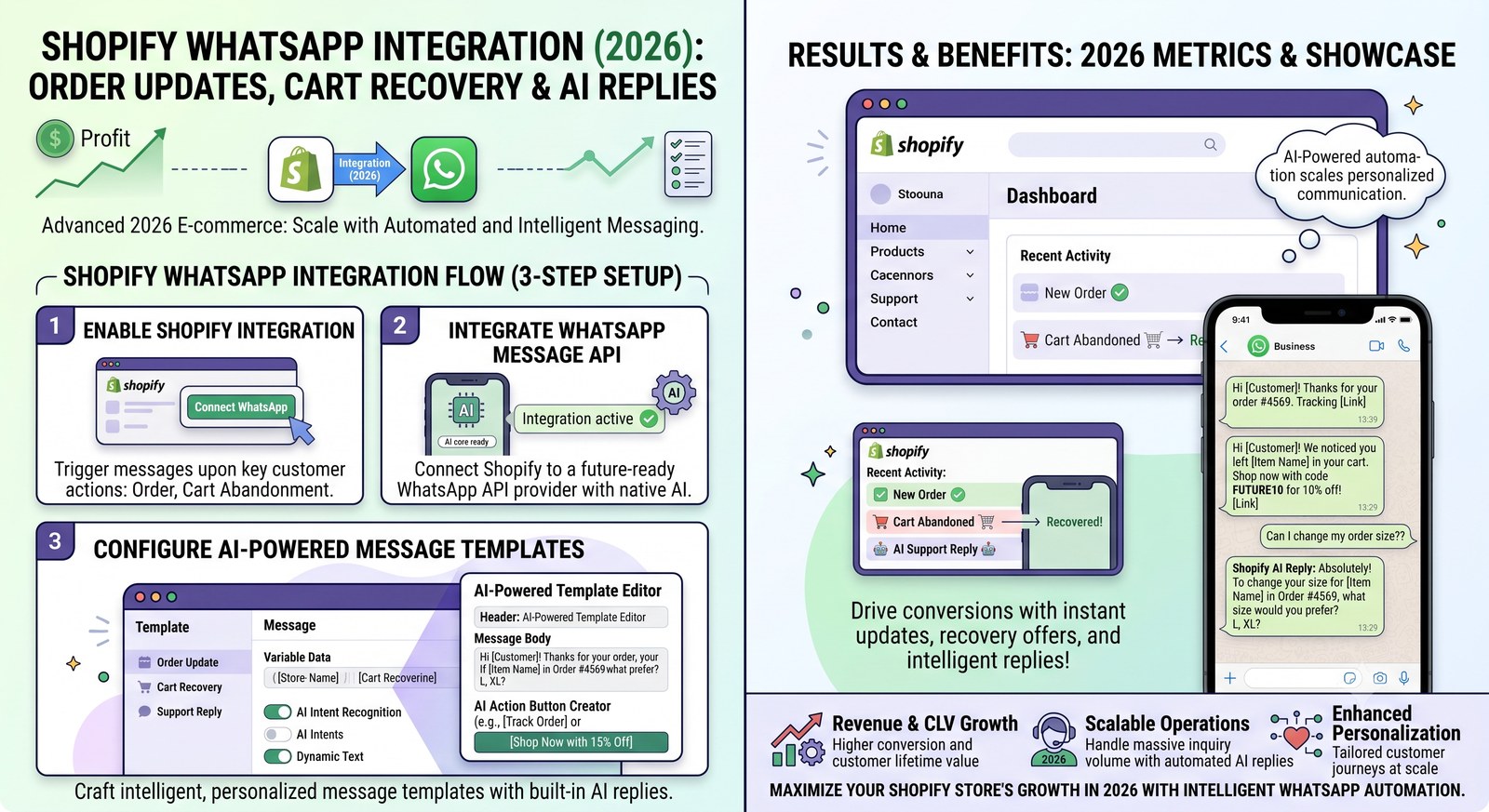
Shopify WhatsApp Integration (2026): Order Updates, Cart Recovery & AI Replies
Connect Shopify to WhatsApp: automatic order confirmations, shipping updates, abandoned-cart recovery and AI that answers 'where is my order' — the setup steps and templates that make it live in a day.
Read →Abandoned Cart Recovery on WhatsApp: Templates That Recover 15–30% of Carts
Why WhatsApp cart recovery beats email 5x, the 6h/24h/72h sequence that works, and the exact template copy with dynamic fields.
Read →WooCommerce Order Status Notifications: Which Events to Automate
Which WooCommerce hooks deserve a WhatsApp message — and which don't. The placed/paid/shipped/delivered map, plus on-hold, failed and refund flows.
Read →COD Confirmation on WhatsApp: Cut RTO and Fake Orders in Half
The single highest-ROI automation for Indian D2C: confirm cash-on-delivery orders on WhatsApp before dispatch and watch return-to-origin collapse.
Read →WhatsApp WooCommerce Integration: Setup + Ready-to-Use Templates (2026)
How to connect WooCommerce to WhatsApp and automatically send order confirmations, shipping updates and cart recovery messages — with the exact templates stores use and the setup steps that take under a day.
Read →